
SciLor's HD2 / Leo Multitouch Demo
v3
Write your own apps with multitouch for your HTC HD2 - Demo App
Support us
PayPal |
Flattr |
Bitcoin |
|---|---|---|
 Send bitcoins to: 19nKUQzjtKjEWe5d7yRLPCpK9SLXM76p9B
|
I have managed it to get Multitouch running over VB.Net and Windows Mobile:
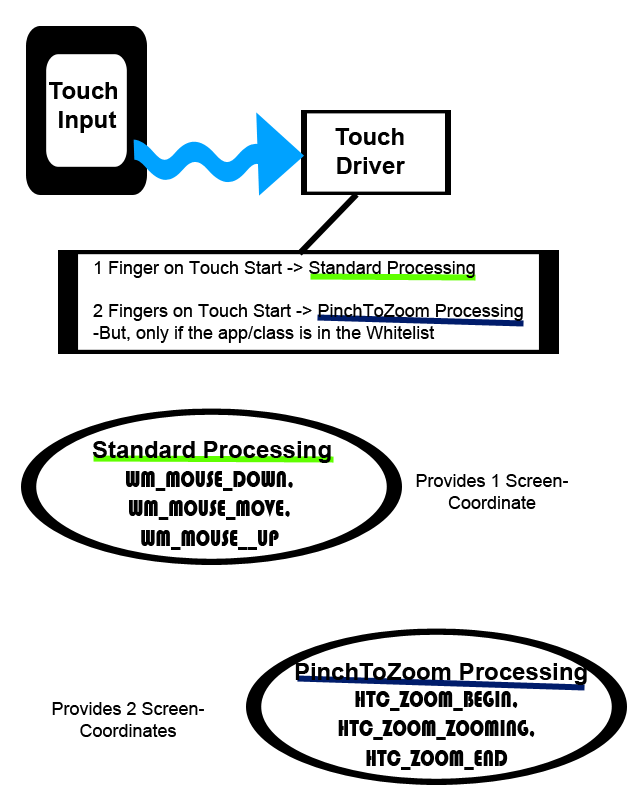
As you see on the drawing, the touch driver (which seems to be the "TouchGL.dll" in case of Multitouch) decides was to do. If it is a single touch just send the standard Windows Messages. But if there are 2 fingers on the screen (must be in the same moment from the beginning) it is checked wheater the app or class is in the whitelist and then the HTC_ZOOM Window Messages are send.
My App translates those HTC Window Messages to standard Mouse Window Messages. This .Net DLL does it easily for you ;) :
There are still some bugs, which have to be resolved:
-Stop auto alignment!
-Allow the fingers touch the screen seperately
As you see on the drawing, the touch driver (which seems to be the "TouchGL.dll" in case of Multitouch) decides was to do. If it is a single touch just send the standard Windows Messages. But if there are 2 fingers on the screen (must be in the same moment from the beginning) it is checked wheater the app or class is in the whitelist and then the HTC_ZOOM Window Messages are send.
My App translates those HTC Window Messages to standard Mouse Window Messages. This .Net DLL does it easily for you ;) :
			Private Function WndProc(ByVal hWnd As IntPtr, ByVal msg As Integer, ByVal wParam As IntPtr, ByVal lParam As IntPtr) As IntPtr
				Select Case msg
					Case ZoomBegin
						Call frmMulti.pctDraw_MouseDown(New Object(), New System.Windows.Forms.MouseEventArgs(MouseButtons.Middle, 1, HiWord(lParam) - frmMulti.Left, LoWord(lParam) - frmMulti.Top, 0))
						Call frmMulti.pctDraw_MouseDown(New Object(), New System.Windows.Forms.MouseEventArgs(MouseButtons.Right, 1, HiWord(wParam) - frmMulti.Left, LoWord(wParam) - frmMulti.Top, 0))
					Case ZoomEnd
						Call frmMulti.pctDraw_MouseUp(New Object(), New System.Windows.Forms.MouseEventArgs(MouseButtons.Middle, 1, HiWord(lParam) - frmMulti.Left, LoWord(lParam) - frmMulti.Top, 0))
						Call frmMulti.pctDraw_MouseUp(New Object(), New System.Windows.Forms.MouseEventArgs(MouseButtons.Right, 1, HiWord(wParam) - frmMulti.Left, LoWord(wParam) - frmMulti.Top, 0))
					Case Zooming
						Call frmMulti.pctDraw_MouseMove(New Object(), New System.Windows.Forms.MouseEventArgs(MouseButtons.Middle, 1, HiWord(lParam) - frmMulti.Left, LoWord(lParam) - frmMulti.Top, 0))
						Call frmMulti.pctDraw_MouseMove(New Object(), New System.Windows.Forms.MouseEventArgs(MouseButtons.Right, 1, HiWord(wParam) - frmMulti.Left, LoWord(wParam) - frmMulti.Top, 0))
				End Select

				Return CallWindowProc(oldWndProc, frmMulti.Handle, msg, wParam, lParam)
			End Function
There are still some bugs, which have to be resolved:
-Stop auto alignment!
-Allow the fingers touch the screen seperately
v3 (2009-12-25)
-Now uses my Multitouch DLL
-Added another missing dll ;)

----------------

v2 (2009-12-03)
-Fix Random crashes
-Cleaned up code
-Finger following
-Gravity Ball
HTC HD2 / Leo Proof of Concept: REAL Multitouch
HTC HD2 / Leo REAL Multitouch v2 - now Stable

CONNECT WITH US


